



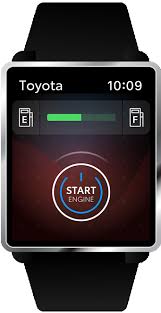
 In this video below, learn how to set up Remote Connect on your smartwatch. Learn how to set up your Apple Watch or Android Wear and connect it to your vehicle in this easy step by step tutorial.
How to set up Remote Connect on Apple Watch:
• Ensure your vehicle is equipped with Remote Connect
• Ensure that you’re registered for Toyota Connected Services via your Toyota Owner’s account
• Install Remote Connect App onto iPhone & sign in
• Open Watch App, select “My Watch Tab,” scroll to find Remote Connect & install
• Open app on Apple Watch
• Use the same pin as you used on the Remote Connect App
• Choose to enable or disable pin requirement & voice command
How to set up Remote Connect on Android Wear:
• Ensure your vehicle is equipped with Remote Connect
• Ensure that you’re registered for Toyota Connected Services via your Toyota Owner’s account
• Wake up watch via power button if needed
• Find & select “Play Store” within list of apps
• Within “Play Store,” scroll to find Apps within your phone section & find Remote Connect
• Tap it to download to the watch
![[Facebook]](https://www.passporttoyota.com/blogs/716/wp-content/plugins/bookmarkify/facebook.png)
![[LinkedIn]](https://www.passporttoyota.com/blogs/716/wp-content/plugins/bookmarkify/linkedin.png)
![[Twitter]](https://www.passporttoyota.com/blogs/716/wp-content/plugins/bookmarkify/twitter.png)
![[Yahoo!]](https://www.passporttoyota.com/blogs/716/wp-content/plugins/bookmarkify/yahoo.png)
![[Email]](https://www.passporttoyota.com/blogs/716/wp-content/plugins/bookmarkify/email.png)
Connect with us


